Should You Track Craft Fair Sales in a Spreadsheet or an App?

You're in the car after a market, phone in hand, adding up your total. "Pretty good day," you think. Then you drive home, unload everything, eat dinner, and mentally promise yourself you'll put it all in the spreadsheet later.
Two weeks later, you're prepping for the next event. You open the spreadsheet. Half the rows are blank. You can't remember which candle scents sold out at that spring market, or whether the booth fee at that new venue was worth it. You have a number, but you don't have answers.
This is the core problem with tracking craft fair sales, and it's not really about the spreadsheet. It's about the gap between "what happened" and "what you recorded." The more events you do, the more that gap costs you. Not in one big way, but in dozens of small decisions you can't quite make with confidence.
The question worth asking isn't "spreadsheet or app?" It's "which tool fits where my business actually is right now?"

Is a spreadsheet good enough to track craft fair sales?
Yes, for most vendors starting out. A spreadsheet handles revenue, costs, and basic product notes just fine when you're doing a handful of shows a year and selling through one channel. The trouble starts when your event count grows, your product list expands, or you're spending more time maintaining the sheet than making things.
Spreadsheets earn their place early on. They're free, flexible, and you can build one in 20 minutes. If you're doing 3 or 4 events a year with a small product range, a Google Sheet will tell you everything you need. It won't tell you automatically, and it won't remind you to fill it in, but it'll work.
The thing that matters most at this stage is building the habit of recording the right numbers. Tracking your craft fair performance across events is what turns guessing into deciding, whatever tool you use. A simple spreadsheet filled in consistently beats a complicated system you abandon after the third event.
Where spreadsheets start to strain is around the 6-to-10 event mark. That's when tabs multiply, copy-pasting becomes a chore, and filling in the data from memory three days later becomes the norm. A spreadsheet can hold your numbers. It can't hold the context around them, and it can't surface patterns without you doing all the work.
What should you actually track after every craft fair?
At minimum: total revenue, total transactions, items brought versus items sold (your sell-through rate), total event costs including booth fee and travel, and total hours from loading the car to unpacking at home. Those 5 numbers, recorded the same day, give you what you need to compare events and improve over time.
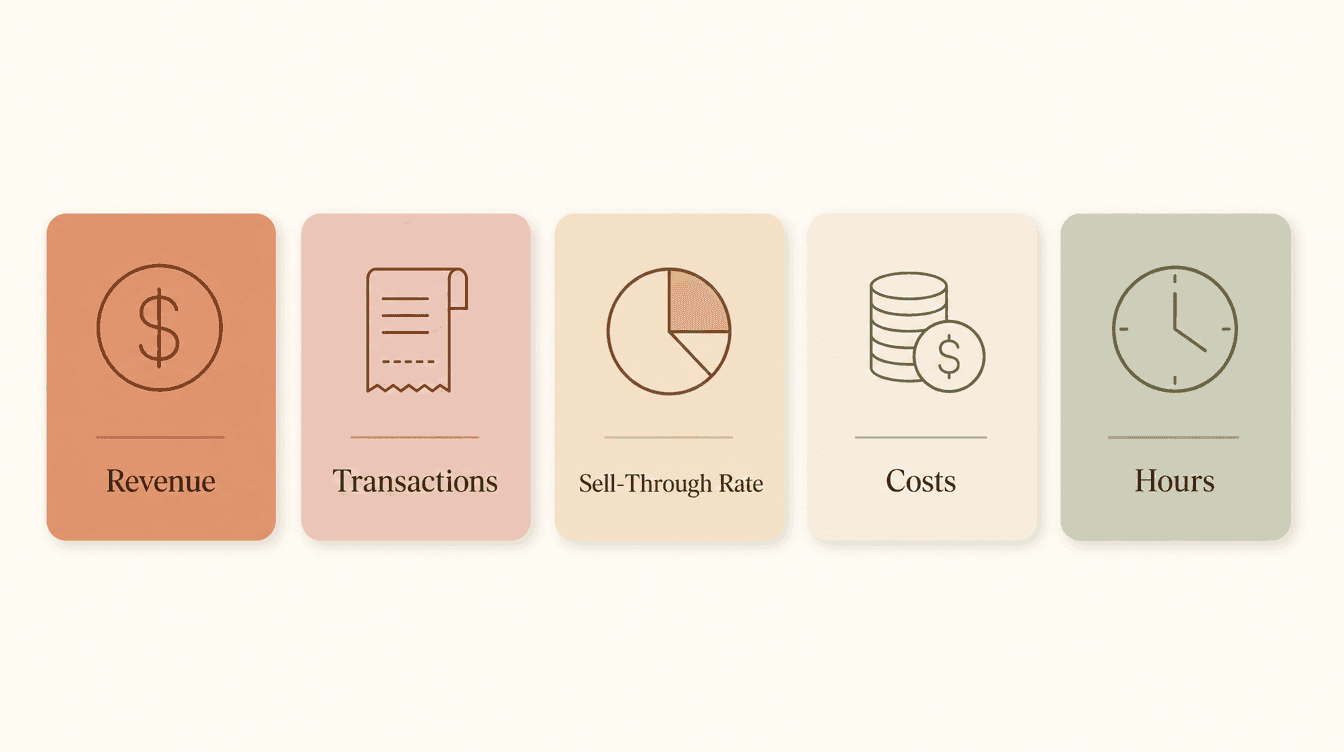
Most vendors track 1 or 2 of these and skip the rest. Which is why prepping for the next event tends to feel like starting from scratch.
The sell-through rate is the one most people skip, and it's the one that changes how you think about production. Experienced vendors who've tracked it across dozens of shows put a healthy range between 50 and 70%. Below 50% and you're hauling too much home. Above 70% and you probably ran out of something before the day ended, which means you left money on the table.
Revenue per hour is worth adding early too. Take your total revenue and divide it by total hours, door to door. It's the most honest way to compare events because it accounts for differences in booth fees, show lengths, and drive times. A $500 day at a 4-hour local market often beats an $800 day at a big show an hour away. The math will tell you. Your gut usually won't. The Profit Calculator can run these numbers without you building any formulas yourself.
Where spreadsheets break down
The 3 breaking points tend to show up in this order.
The copy-paste problem. By event 8 or 10, you've got a spreadsheet with 8 or 10 tabs. Pulling a comparison across them takes real effort. Which products did you sell most at the spring market vs. the holiday one? What was your sell-through rate across all events this year? These aren't hard questions, but a spreadsheet makes you do all the work to answer them.
The timing problem. Studies consistently show that around 88% of spreadsheets contain errors, and the main culprit isn't bad formulas. It's data filled in from memory hours or days after the fact. You remember the rough total. You don't remember which sizes sold out, or that one customer who bought 4 of the same item. That's the detail that makes your notes useful 6 months from now. The fix is capturing notes before you drive home. A 5-minute post-event debrief in the parking lot is worth more than a detailed review attempted on Wednesday.
The maintenance problem. Research puts the average at around 240 hours lost per year to repetitive manual data entry. For a solo vendor doing 10 or 15 events a year, the number is smaller, but the principle holds. At some point the spreadsheet becomes a second job, and that time comes directly out of the hours you could spend making.
Craftybase, which builds inventory tools for makers, has a useful rule of thumb: most makers outgrow a spreadsheet when they pass 25 active products, sell on more than one channel, or spend more than 2 hours a week on manual entry. None of those thresholds are magic numbers, but they're a good signal to pay attention to.
What can a dedicated app do that a spreadsheet can't?
3 things that matter in practice: keep everything in one place, connect to your sales data so you're not re-entering it, and surface patterns across events without you having to dig.
On the "one place" point: when your event notes, packing checklist, and sales data all live together, prep for the next market takes minutes instead of an hour. There's no hunting through old phone notes or trying to remember which tab has last November's numbers.
On connecting to sales data: if you already use Square, you're generating a record of every transaction. Using that Square data for planning means you're not re-entering anything. You're reviewing and deciding, which is a much better use of prep time.
On patterns: after 5 or 6 events, patterns start to emerge. Certain products sell in the first hour at every show. Certain events never quite cover the booth fee. These aren't insights you need an app to have, but they're insights a spreadsheet makes genuinely hard to see. When we looked at our own data, it flagged that a product we were spending a lot of time making, 3D-printed deck boxes, had low sales and low margins across multiple events. That data made the decision easy. We stopped making them. That kind of clarity is what good tracking actually enables.
How do you know when it's time to switch?
2 questions are worth asking.
First: how many shows are you doing this year? Under 6, selling through one channel, a spreadsheet is probably fine. You don't need more infrastructure than the problem requires. The Booth Fee Evaluator can help you run the math on any event without a spreadsheet, but a full tracking app is probably more than you need at this stage.
Second: are you spending more than 90 minutes a week on your tracking system? If yes, the spreadsheet is costing you more time than a paid tool would cost in money. That's the clearest signal there is.
A good starting point if you're not there yet
If you're in year one or year two, you don't need an app. You need a habit.
A Google Sheet with 5 columns works fine: event name, date, revenue, total costs, hours. Fill it in the same evening. Add a notes column for anything that stands out: what sold fast, what sat, one thing you'd change. That's it.
Then, the week before your next comparable event, look back at those notes. This is what figuring out how many of each product to make actually looks like in practice: not a formula, but a record of what happened last time. You're building a small evidence base, one event at a time.
When the spreadsheet starts fighting you, that's your signal. Not when you hit a specific event count, but when maintaining the system starts taking energy away from the work. At that point, a tool that keeps your notes, numbers, and checklist together isn't a luxury. It just makes the next prep session easier.
If you're at that point, MyEventPrep is free to try, no credit card needed. If the spreadsheet is still working for you, stick with it.
Frequently Asked Questions
Can I use Google Sheets to track craft fair sales?
Yes. Google Sheets is a solid starting point for vendors doing a handful of events per year. It's free, flexible, and quick to set up. The main limitation is that you have to enter everything manually, build your own comparisons, and remember to fill it in promptly. For most vendors in the first year or two, that's a perfectly reasonable tradeoff.
What's the easiest way to track inventory at a craft show?
The simplest method is a printed product list with quantities and a pen to tick off items as they sell. For a step up, record sales in a POS app like Square during the event and pull the data into your tracking system afterward. Either way, recording your sell-through rate, how many items you sold versus how many you brought, is the number that tells you how to adjust what you make next time.
Do I need an app if I only do a few events a year?
Probably not yet. A spreadsheet handles 3 to 5 events a year just fine if you fill it in consistently. The case for a dedicated app gets stronger when you're doing 6 or more events, selling across multiple channels, or finding that maintaining your tracking is cutting into production time.
How do I compare my performance across different craft fairs?
Revenue per hour is the most reliable comparison. Divide your total revenue by the total hours spent on the event, from loading up to unpacking. It accounts for differences in event length, booth fees, and travel that make raw revenue totals misleading. SmartAsset's breakdown of craft fair economics walks through this calculation in more detail if you want to get precise.
What's the difference between inventory tracking and sales tracking for craft vendors?
Inventory tracking is about what you have on hand: unit counts, materials used, what's ready to sell. Sales tracking is about what sold, when, where, and for how much. For most craft fair vendors, sales tracking comes first. Knowing which products sold at which events drives your production decisions. Inventory tracking becomes more important once your catalog grows large enough that you're at risk of showing up short on your best sellers.