How to use Square sales data to plan your next market

Most craft vendors prep for their next market the same way every time. They guess. They pack what they packed last time, add a few new pieces, and hope for the best. Meanwhile, Square has been quietly logging every sale they've ever made, with timestamps, item names, and quantities, all just sitting there.
The data is already yours. It's just hiding inside reports nobody trained you to read.
If you've used Square at even three or four events, you have enough information to stop guessing about what to make for the next one. This post shows you how to find that information, how to read it like an event planner instead of an accountant, and how to turn it into a real prep plan. No formulas to memorize. No spreadsheet wizardry. Just a calmer way to walk into your next show.
What does Square actually track that matters for event prep?
Square tracks four things craft vendors care about most: which item sold, how many of it sold, when it sold, and what it sold for. If stock tracking is turned on for your items, it also keeps a running count of what's left. Those four data points are everything you need to plan a smarter next event.
Most vendors only ever look at the daily totals on the home screen. That number tells you how the day went, but it doesn't tell you anything about why. The "why" lives in the item-level reports, and those are the ones worth your time.
You don't need to track every variation, every category, or every modifier. Start with the basics. The goal isn't a perfect dataset. The goal is a few clear answers about what to make next.
Pulling your first useful report
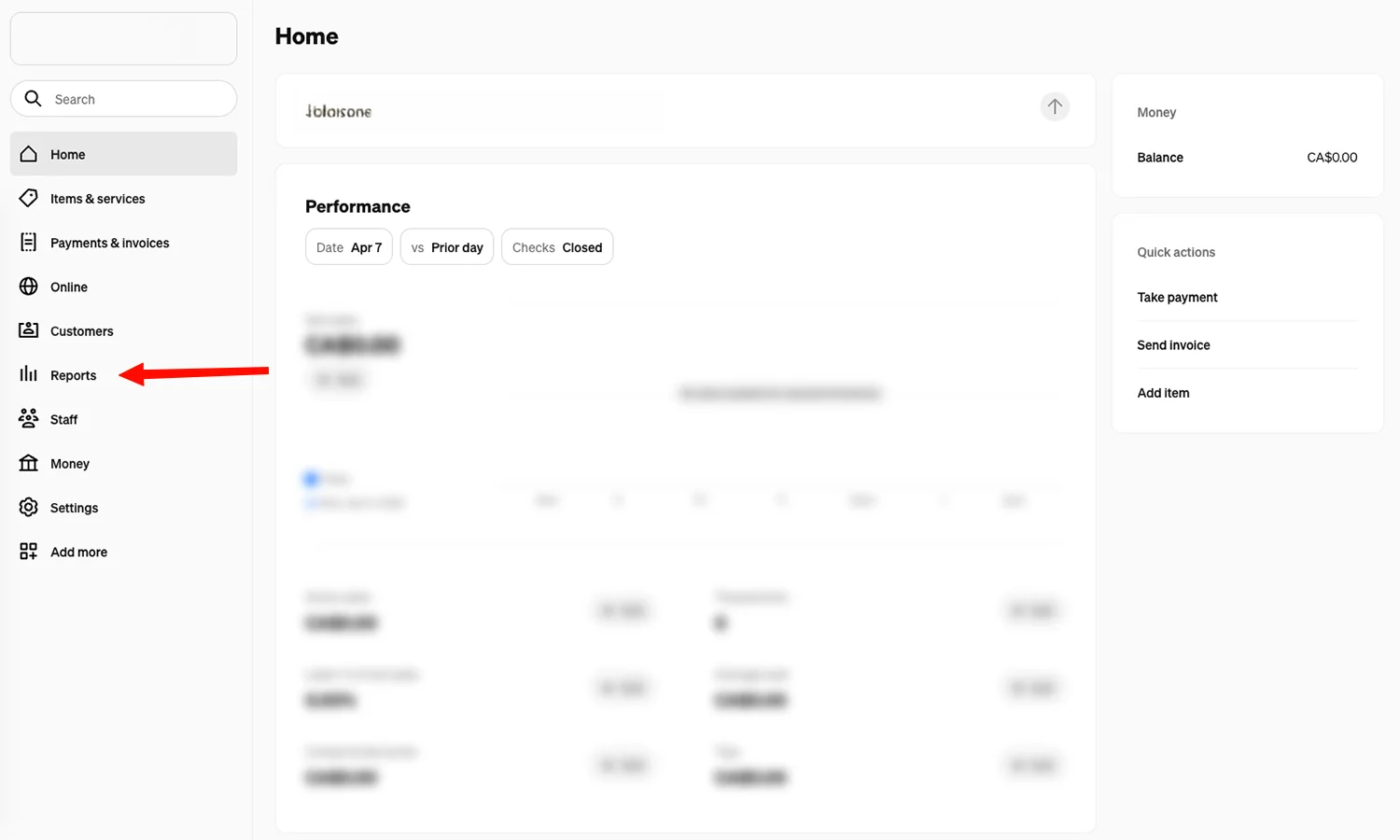
Sign in to your Square Dashboard on a laptop — the mobile app hides most of the good stuff. From the sidebar, click Reports.
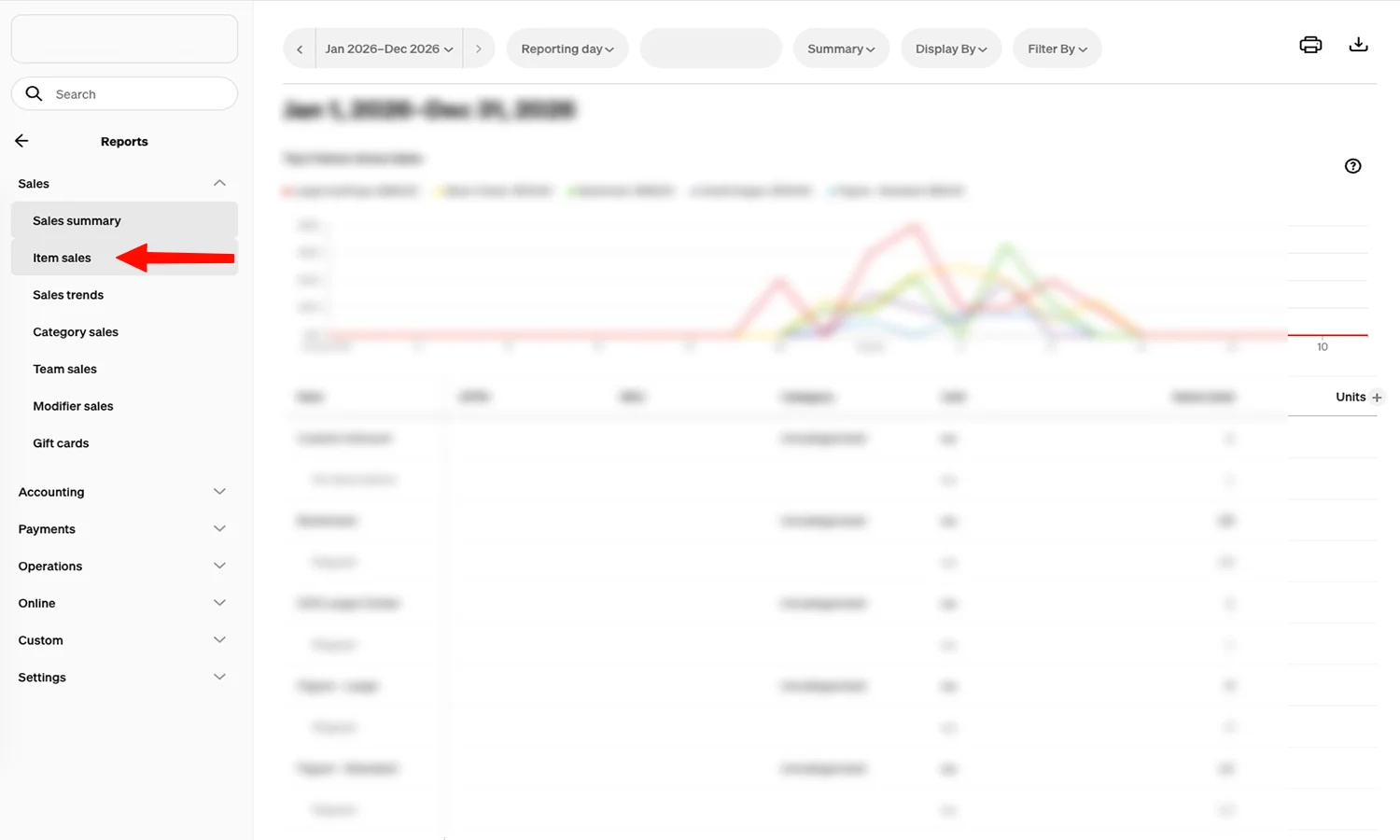
Inside Reports, click Sales, then Item Sales.
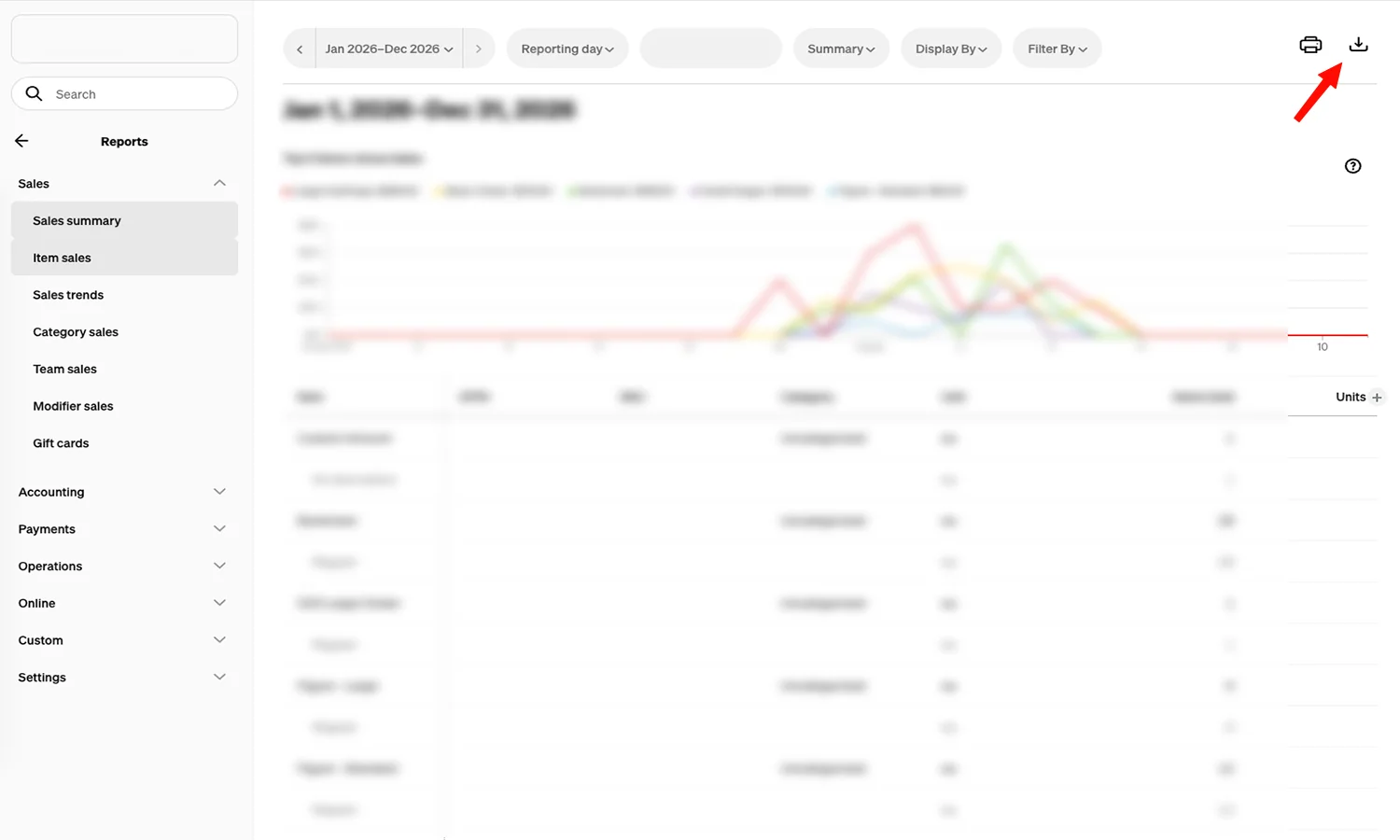
Set the date range to cover one past event — usually a Saturday or a weekend. Then click Export in the top-right.
When the export dialog opens, pick Item Sales Summary — not Detail. The Summary export gives you one row per item with totals already aggregated, which is exactly what you need.
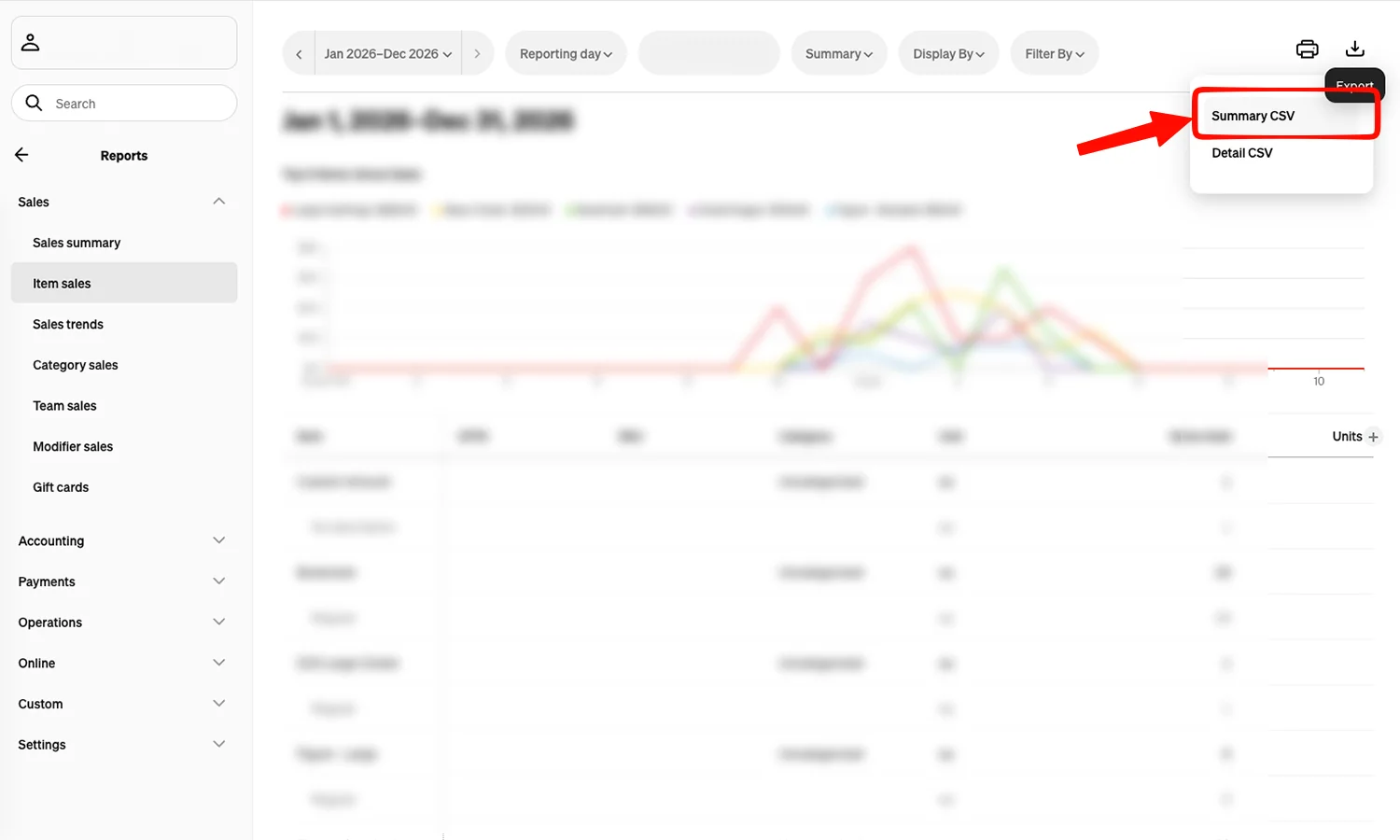
That's it. That's the whole technical part.
If you've run multiple events recently, do this once for each one and label the files clearly: "Spring Market on Main 2025," "Fall Pop-Up 2025," and so on. The label matters more than you think. A folder of unlabeled CSVs is just digital clutter, not a planning tool.
One quick note: stock tracking has to be enabled in your Square Library for item-level quantities to show up correctly. If your reports look thin or empty, that's usually why. You can read Square's official guide to item sales reports if you get stuck on the navigation.
How do I find my best sellers in Square?
Open your exported Item Sales report and sort by "Items Sold" (quantity), not by "Gross Sales." Quantity tells you what people actually picked up and walked away with. Gross sales can be misleading because one expensive piece can outweigh ten popular small ones, even though the small ones tell you more about demand.
Look at the top of the list. Those are your hits. Then look at the bottom. Those are the items you keep packing but nobody's buying.
Now do the same thing for your other event exports. Compare the lists side by side. The items that show up at the top of every event are your true bestsellers. The items that show up at the bottom of every event are the ones quietly costing you bin space, setup time, and decision fatigue.
You're not looking for a perfect ranking. You're looking for patterns.
Reading the report like an event planner, not an accountant
Accountants care about totals. Event planners care about ratios.
The most useful number you can pull from a Square report isn't gross sales. It's your sell-through rate: how much of what you brought actually sold. If you packed 30 candles and sold 18, your sell-through rate was 60%. That single number tells you more about what to make next than any revenue figure.
This is also where most vendors hit a wall, because Square doesn't know which sales happened at which event. It just knows what sold on a given day. That's a real gap, and it's worth being honest about.
How much should I make for the next market?
Look at how much of your top item sold at the most recent comparable event, multiply by 1.5 to give yourself headroom, and use that as your target production number. Then repeat the math for your next four or five strongest items. That's your starting plan.
A worked example. Say your last spring market was outdoors, similar size, similar weather. You sold 22 of your small candles, 14 of the medium, and 6 of the large. For the next event of the same shape, aim to bring around 33 small, 21 medium, and 9 large. You'll have enough to ride a strong day without lugging home a heavy bin if it rains.
This is rough math on purpose. You don't need precision. You need a plan that's better than guessing, and almost any plan tied to real past data is better than guessing.
If you want a structured way to think about volume more broadly, the booth-fee rule is a useful sanity check: aim to bring inventory worth 8 to 10 times your booth fee, and aim to sell 4 to 5 times that fee. Cross-check the production numbers from your Square data against that rule. If they're wildly off, one of them needs adjusting.
The gaps Square data won't fill on its own
That context lives in your head, in random sticky notes, or in nowhere at all. And it's the context that turns a sales report into a real prep plan.
The fix isn't more spreadsheets. It's a habit: capture three things after every event while it's fresh. What sold faster than expected. What didn't move. One thing you'd do differently next time. Three sentences. That's all.
When you pair those three notes with your Square data, you get something Square alone can't give you: a memory of your events, not just a list of transactions.
How MyEventPrep turns your Square data into a prep plan automatically
MyEventPrep connects directly to your Square account, pulls your product catalog and sales history, and ties each sale to the actual event it happened at. From there, it builds a production plan that tells you what to make, how many to make, and roughly how many hours it will take. The notes you take after each event live next to the numbers, so when you're prepping again, last-time-you is right there helping.
You can still pull your own CSVs and crunch them by hand. Plenty of vendors do, and there's nothing wrong with it. But if the spreadsheet step is the part that keeps slipping, this is the work the tool is built to handle. You don't have to track everything. You just have to start with one event.
See how the prep plan works on the homepage if you want a quick walkthrough first.
Start with one event
Two takeaways. First, your Square data is more useful than you think, and it only takes one export to prove it. Second, the data alone won't build a prep plan. You need event context, sell-through ratios, and a few honest notes about what worked.
Pick one upcoming market. Pull the Item Sales report from the last comparable event. Sort by quantity. Pick your top five. Multiply by 1.5. That's your starting production list, and it'll be better than anything you would've packed from memory.
If you'd like the connecting, tagging, and remembering done for you, connect Square to MyEventPrep free during early access. No credit card. No pressure. Start with one event and see how it feels.
Frequently asked questions
Where do I find item sales reports in Square?
Sign in to your Square Dashboard from a browser, then go to Reports, then Sales, then Item Sales. Use the date selector to pick a past event date range. The mobile app has limited reporting, so use a laptop or tablet for this.
Can I export Square sales data to a spreadsheet?
Yes. From the Item Sales report inside the Square Dashboard, click Export in the top-right corner and choose Item Sales Summary (CSV). The export gives you one row per item with total quantity sold, gross sales, and refunds — everything you need to plan inventory for your next market.
What's a good sell-through rate at a craft fair?
A healthy target is 50% to 70%. Selling 100% of an item every time usually means you're either underpricing it or not bringing enough. Selling less than 30% usually means too much inventory, the wrong audience, or a display issue. Sell-through is a better signal than total revenue when you're planning what to make next.
How much inventory should I bring to a craft show?
A common rule is to bring inventory worth 8 to 10 times your booth fee, and aim to sell 4 to 5 times that fee. For example, a $100 booth fee suggests bringing $800 to $1,000 in product and aiming for $400 to $500 in sales. Use your Square sales data from past events to refine those numbers for your specific booth.
Does MyEventPrep work without Square?
Yes. You can use MyEventPrep without connecting Square by adding products and events manually. Connecting Square just makes the setup faster and lets the production plan use your real sales history automatically.