Split Room
Double booths where you want display and a working demo area
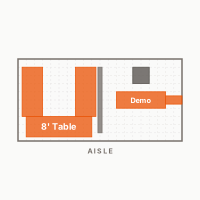
A 10×20 is easy to waste. The mistake most vendors make is just stretching their 10×10 layout into the extra space — more tables, same approach. Split Room treats the two halves as different rooms: one half is the retail store, the other is your workroom. Customers shop the front. You demo, restock, and run payment from the back. The dividing line can be a pipe-and-drape run, a shelf unit, or just a deliberate gap in the layout — what matters is that the customer-facing half is clean and curated, and the working half is yours. The only time this doesn't work is when your product benefits from walk-through flow. If you need customers to move through the whole space, use the Walk-Through Store instead.
What you’ll use
The pieces that make up this layout. Each color matches the category pill you’ll see in the editor — so the diagram above reads the same as the app.
- 1×8ft TableTables
- 2×6ft TableTables
- 1×Pipe & Drape (8ft)Storage
- 1×Demo Counter 6ftTables
- 1×Payment CounterTables
- 1×Director ChairFurniture
Tips from the setup
- 01
Keep the retail half to your best 30–40% of inventory. More product doesn't mean more sales — it means harder decisions for shoppers.
- 02
The divider line doesn't have to be physical. A rug that ends at the midpoint and bare floor behind it sends the same signal.
- 03
Run a demo counter facing the front so customers can watch you work without crossing into your zone.
- 04
Checkout in the back half, slightly off-center toward one side. Paying customers step back without blocking the main display.
Other layouts to consider
Make this layout your own
Free to start. Move things around to match your actual gear. Save it once, reuse it every event.